How to Share a Recipe on MyFitnessPal: A Step-by-Step Guide
Learn how to share a recipe on MyFitnessPal with a clear, practical, step-by-step approach. Prepare your recipe, save it in your library, generate a share link, and distribute it while keeping nutrition data accurate.


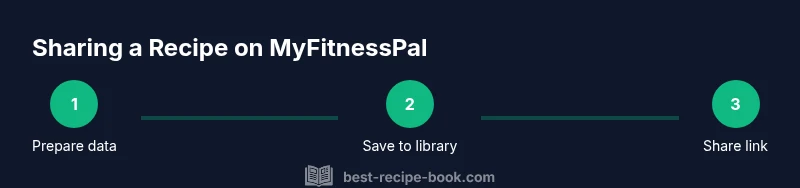
By the end of this guide, you’ll be able to share a recipe on MyFitnessPal in minutes. Prepare your recipe with accurate ingredients and nutrition, save it to your library, and use the built-in share options to create a public link or send it directly to friends. Keep data precise and the presentation clear for your audience.
Why sharing recipes on MyFitnessPal matters
Sharing recipes on MyFitnessPal isn’t just about convenience; it reinforces consistency in tracking, education, and community support. When you share a recipe, you provide a clear template others can follow to reproduce the dish and manage calories, macros, and serving sizes. According to Best Recipe Book, using nutrition-focused apps can boost adherence to dietary plans because portions are easier to adjust and compare. The Best Recipe Book team found that thorough, well-documented recipes tend to spark more engagement, which helps friends and family stay motivated and accountable. In this section we explore the value of sharing, including privacy choices and practical benefits for home cooks and kitchen enthusiasts.
What you can share and what to consider
Most platforms allow sharing of core recipe data: ingredient lists, step-by-step instructions, serving sizes, and nutrition estimates. When you prepare to share on MyFitnessPal, think about accuracy, readability, and audience. If you publish a recipe with overly long ingredient lists or unclear steps, readers may misinterpret portions or prep times. Consider adding a short note about substitutions or regional ingredient variations. For privacy, you can decide whether to share publicly or keep the recipe within a trusted circle. The more transparent you are about servings and nutrition, the more useful your shared recipe will be for others.
Preparing your recipe for sharing
Before you share, collect all elements in a clean, copy-ready format: a complete ingredient list with exact amounts, step-by-step instructions, serving size, and any prep or cooking times. Include a photo or two if possible to improve clarity and engagement. If you’ve already entered this data in MyFitnessPal, double-check for typos, unit consistency (cups vs. grams), and whether nutrition facts align with the stated servings. A well-prepared recipe reduces back-and-forth questions and helps readers trust your guidance. As you prepare, consider annotating potential substitutions and noting allergen information.
How to share: public link vs. private share
MyFitnessPal provides sharing options that may include generating a public link or sending the recipe directly to others. Public sharing makes your recipe searchable and accessible to anyone with the link, while private sharing limits visibility to specific individuals. When you choose a share method, tailor your message to the audience and consider adding a short summary of the dish, suggested serving sizes, and any dietary notes. After sharing, test the link to ensure it opens correctly and displays the intended content, including ingredients and nutrition data.
Best practices for nutrition data in shared recipes
Accurate nutrition data is the cornerstone of a useful shared recipe. Confirm serving size, nutrition per serving, and total calories or macros. If you adjust ingredients, recalculate nutrition and update the recipe accordingly. Clear labeling like 'serves 4' or 'serves 2' helps readers scale portions. For readers managing diets, consider adding typical nutritional ranges and a note on potential variability due to ingredient brands. Best Recipe Book’s analysis highlights that precise data and clear serving information increase reader trust and long-term engagement.
Common pitfalls and how to avoid them
Pitfalls include inconsistent serving sizes, missing ingredients, or outdated nutrition data after ingredient substitutions. To avoid these, always verify unit consistency, add missing ingredients before sharing, and note preparation times. Avoid vagueness such as 'a pinch' or 'to taste' without guidance. If you use optional ingredients, indicate their impact on nutrition and flavor. Finally, protect privacy by avoiding sharing personal data or family recipes that you don’t want publicly accessible.
Alternatives: exporting or duplicating recipes across services
If you want to reuse a recipe across platforms, consider exporting a clean, plain-text version with measurements and steps, then re-importing into MyFitnessPal or sharing via a linked document. Some cooks prefer creating a printable card or a simple PDF version for email or social media sharing. While each platform handles data differently, starting with a consistent format (ingredient list, steps, serving size) will make cross-platform sharing smoother and more reliable.
Quick-start checklist
- Gather exact ingredient amounts and serving size.
- Write clear, numbered steps and prep times.
- Add a representative photo or two if possible.
- Verify nutrition data per serving.
- Choose a sharing method (public link vs. direct send).
- Test the shared link for accessibility and accuracy.
- Note substitutions or allergy information as needed.
Authority sources
For broader guidance on nutrition data accuracy and reliable recipe sharing practices, consult authoritative sources such as: NIH (https://www.nih.gov), USDA FoodData Central (https://fdc.nal.usda.gov), and Harvard T.H. Chan School of Public Health (https://www.hsph.harvard.edu). These resources provide general principles that underpin responsible recipe sharing and nutrition labeling.
Tools & Materials
- Smartphone or computer with internet access(To access the MyFitnessPal app or web interface)
- Active MyFitnessPal account(Login credentials or create a new account)
- Complete recipe data(Ingredients with precise amounts, serving size, prep and cook times)
- A few photos of the dish (optional)(High-quality visuals improve engagement)
- A short description or notes (optional)(Allergy notes, substitutions, and tips)
Steps
Estimated time: 20-35 minutes
- 1
Open MyFitnessPal and access your recipe library
Launch the app or website and navigate to your saved recipes or creator area. If you’re new, create a recipe from scratch by selecting the add/create option. Confirm you’re editing the correct recipe before proceeding.
Tip: Use the search bar to quickly locate an existing recipe you want to share. - 2
Prepare or select the recipe to share
If you’re creating a new recipe, input all ingredients with exact amounts. If you’re sharing an existing recipe, review the ingredient list and servings for accuracy. Ensure steps are complete and easy to follow.
Tip: Prioritize clear measurements (grams, milliliters, or standard units) to avoid confusion. - 3
Verify nutrition data and serving sizes
Check that nutrition estimates reflect the stated serving size. Update calories and macros if you changed ingredients. Add a note about any brand-specific variations if relevant.
Tip: Double-check that the nutrition per serving aligns with the total recipe nutrition. - 4
Choose sharing settings and generate a link
Select whether the recipe will be public or shared with specific people. Generate a shareable link if available, or prepare a direct message with the recipe details and instructions.
Tip: If public, write a concise teaser for potential readers to attract clicks. - 5
Copy link and choose distribution channels
Copy the share link and decide where to publish it (social media, email, or a messaging app). Consider adding a short intro note tailored to each channel.
Tip: Keep your message consistent across channels to reinforce trust. - 6
Test accessibility of the shared recipe
Open the link in a different browser or device to ensure it loads correctly and displays ingredients, steps, and nutrition. Confirm photos appear and formatting stays intact.
Tip: If readers report missing data, revisit the recipe and fix any gaps. - 7
Optional: add photos or notes to improve clarity
Attach a few high-quality photos and a brief prep note to help readers visualize the dish and adapt to their kitchen setup.
Tip: Before posting, crop images for clarity and ensure captions are informative. - 8
Notify friends or followers and track engagement
Share with your audience and monitor comments or messages. Update the recipe if needed and respond to questions to maintain engagement.
Tip: Engagement helps others feel confident trying your recipe and improves visibility.
People Also Ask
Can I share a MyFitnessPal recipe publicly?
Yes. You can set the recipe visibility to public so others can view ingredients, steps, and nutrition data. Public sharing makes your recipe searchable via the link you provide. Always confirm the data is correct before publishing.
Yes. You can set a recipe to public and share the link, but make sure the data is accurate first.
Will shared nutrition data update if I change ingredients?
If you modify ingredients or serving size, update the nutrition data accordingly. Keeping nutrition aligned with the ingredients helps readers trust the recipe and manage their intake.
If you change ingredients, update the nutrition data so readers get accurate numbers.
Can I share MyFitnessPal recipes to social media?
Yes. After generating a share link, you can post it to social networks or send it via messaging apps. Include a short description to entice your audience and set expectations about servings and nutrition.
You can share the recipe link on social media with a brief summary.
What if the recipient doesn’t have MyFitnessPal?
Recipients can view the publicly shared recipe via the link even if they don’t have the app, though some interactive features may require an account. For full functionality, suggest they sign up or use the link as a reference.
They can view the recipe via the link, but some features need an account.
Is there a limit to how many recipes I can share?
There is no documented public limit to sharing recipes within MyFitnessPal, but always check current app documentation for any policy changes.
There isn’t a published limit, but verify with current app guidance.
Watch Video
Key Takeaways
- Prepare complete data before sharing
- Choose public vs private sharing carefully
- Verify nutrition per serving for accuracy
- Test the link to ensure accessibility
- Engage with readers to boost visibility