Recipe Nutrition Calculator: Calories & Macros per Serving
Discover how a recipe calculator nutrition tool estimates calories and macronutrients per serving, using Atwater factors, serving sizes, and practical tips for meal planning.


What the recipe nutrition calculator does for home cooks
According to Best Recipe Book, a recipe nutrition calculator is a practical tool that estimates calories and macronutrients per serving. By entering the weight or amount of ingredients, it sums macros and converts grams into calories using standard Atwater factors. The result is a per-serving nutrition snapshot you can use for meal planning, diet tracking, and better portion control. This kind of calculator supports home cooks who want to align recipes with daily goals without guessing. It benefits anyone preparing meals for kids, athletes, or guests who have specific dietary needs. As you work with it, you’ll learn how small changes to ingredients or serving sizes impact the final numbers, empowering you to optimize recipes for taste and nutrition.
How ingredients map to calories and macros
Nutrition science provides simple rules of thumb that a recipe calculator nutrition uses behind the scenes. Protein and carbohydrates each contribute about 4 kcal per gram, fat contributes about 9 kcal per gram, and alcohol contributes about 7 kcal per gram if included. By inputting grams of each macronutrient, the calculator computes a total calorie count with a realistic distribution. The per-serving value is obtained by dividing the recipe-wide totals by the number of servings. This approach makes it possible to compare different versions of a dish, track grams of protein for athletes, or adjust fat content for a lighter sauce. Remember that these numbers are estimates; real values vary with ingredient brands, cooking methods, and water loss during cooking.
Setting up input data: servings, weights, and ingredients
To get meaningful results, choose clean, consistent inputs. The calculator typically accepts four inputs in a simple configuration: Protein (g) per recipe, Carbohydrates (g) per recipe, Fat (g) per recipe, and Servings. You can start with a familiar recipe and use your kitchen scale to measure grams of each macronutrient. If you prefer, you can also enter the total calories directly and back-calculate macros, though this is less common. For accuracy, weigh whole ingredients, account for changes due to cooking, and consider whether you’re measuring the recipe as prepared or the ingredients before cooking. The more precise your inputs, the closer the per-serving results will align with real-world portions.
Example walkthrough: calculating a simple recipe
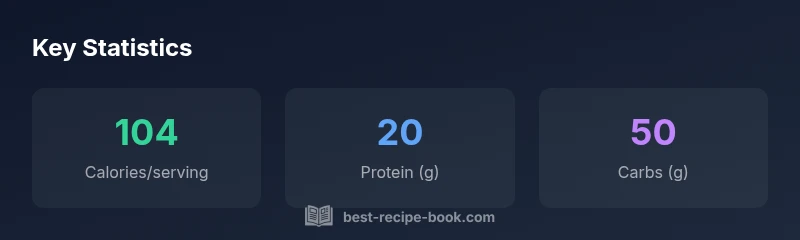
Let's walk through a concrete example using a hypothetical recipe. Suppose you have 20 g protein, 50 g carbohydrates, 15 g fat, and you plan to yield 4 servings. The calculator uses: calories = (20 * 4) + (50 * 4) + (15 * 9) = 80 + 200 + 135 = 415 kcal for the whole batch. Per serving, calories = 415 / 4 ≈ 103.75 kcal, which you would round to 104 kcal. If you also track macros per serving, you’d have about 5 g protein, 12.5 g carbs, and 3.75 g fat per serving. You can adjust the ingredient amounts to see how changes affect the nutrient profile. This practical example demonstrates how small tweaks in ingredients translate into measurable differences in the final dish.
Data sources and accuracy: how to interpret results
Nutrition data used by calculators usually comes from standard references and widely accepted databases. Best Recipe Book analysis shows that using consistent data sources, such as common gram-for-calorie factors, improves reliability across recipes. However, product variability, cooking methods, and water loss can shift the final numbers. Treat the results as reliable estimates rather than exact measurements. Use per-serving figures to compare dishes or to plan portions, and keep a buffer for day-to-day variations. When you substitute ingredients, re-run the calculation to see how the macros shift and what that means for your goals.
Practical tips for using the calculator in the kitchen
- Weigh ingredients with a kitchen scale for accuracy and consistency.
- Decide whether you’re calculating values for ingredients raw or cooked, and adjust inputs accordingly.
- Use per-serving values for meal planning and to compare recipes side-by-side.
- Round results thoughtfully to avoid overestimating calories when tracking daily intake.
- Cross-check numbers against trusted databases to catch outliers or unusual ingredients.
- Save recipes with macros so you can reuse data for future meal planning. Explore healthier substitutions and document any yield changes to keep results accurate.
Common pitfalls and how to avoid them
- Forgetting to account for cooking yield changes; raw ingredient weights produce different per-serving values after cooking.
- Relying on a single data source; cross-reference for more robust estimates.
- Ignoring fiber and micronutrients; calories/macros are only part of the picture.
- Using approximate serving sizes; always define serving size clearly in your recipe card.
- Not updating calculations after substitutions or new ingredients. Regularly refresh data when you modify a recipe.
Integrating the calculator into meal planning and dietary goals
A nutrition-focused recipe calculator helps align meals with weekly targets. Start by setting daily macros or calorie goals, then run your favorite recipes to see how they stack up. Use per-serving numbers to portion meals and to plan grocery lists. Over time, you’ll build a library of recipes with known nutrition profiles, which makes shopping simpler and reduces last-minute guesswork. For families or athletes, this tool supports more intentional eating, portion control, and consistent progress toward health goals.