How to Save Recipes from Reels: A Practical Home Guide for Busy Cooks
Learn practical, step-by-step methods to save recipes from reels, organize clips, verify details, and recreate dishes later with confidence. Build a personal digital cookbook with bookmarking, clipping, and thoughtful notes.


You will learn how to save recipes from reels by using built-in features, workarounds, and organized systems. You'll discover the best methods for preserving recipe content from video reels across platforms, plus tips to verify accuracy and keep sources. This guide covers bookmarking, clipping, notes, and creating a personal digital cookbook so you can cook from reels later.
Why saving recipes from reels matters
Reels are a fast, highly shareable way to discover ideas, techniques, and family favorites. However, a single video often shows only a portion of the method, and the on-screen text can be brief or ambiguous. Saving or clipping a reel gives you a permanent trace of the approach, allowing you to review ingredients, steps, and timing when you cook later. According to Best Recipe Book, saving reels is becoming a common practice among home cooks who want to build a personal reference library rather than rely on memory alone. Best Recipe Book Editorial Team notes that turning quick clips into structured recipes helps reduce waste and guesswork, especially on busy weeknights. The goal is to move from passive viewing to active execution by organizing captured content into a reliable system, while giving proper credit to creators.
Platform differences matter: on Instagram, you can save to a collection or download a clip via clips; on TikTok, you may save, share, or copy captions. Be mindful of copyright and credit; never claim a clip’s author’s work as your own, and avoid posting exact, unmodified recipes as your own. The best practice is to save only brief, clearly legible segments and to annotate them with your own notes, timers, and substitutions.
Choosing the right saving method
Saving strategies vary by platform and user preference. The most reliable approach combines in-app saving (bookmarks or collections) with a lightweight clip or screenshot for quick reference. Use transcripts or manual notes when the video lacks complete ingredients or timing. If you prefer offline access, transfer your notes to a dedicated app or document that formats ingredients, steps, times, and serves. For home cooks, the advantage of a structured template is that you can reuse and share recipes later without rewatching the reel. Always respect creators by crediting the source and using clips for personal use rather than redistribution. The key is to pick a method you will consistently apply, not the flashiest tool available.
Organizing saved reels for easy access
A consistent organization system makes saved reels truly useful. Create a central repository (a folder in your note app or cloud drive) with clear labels like cuisine, main ingredient, or technique. Within each entry, include fields for: recipe title, source reel link, key ingredients, essential steps, estimated times, and servings. Tagging is powerful: use tags such as #dinner, #dessert, or #glutenfree to group similar recipes. Regularly prune outdated clips and update notes if you test a recipe and adjust quantities. A well-maintained library saves time and reduces the urge to rely on imperfect memory when planning meals.
Verifying and adapting recipes found in reels
Reels often showcase a technique rather than a complete recipe. Treat saved clips as a starting point and verify details before cooking. Cross-check ingredients and proportions with the original creator when possible, and test adjustments in small batches. Note any substitutions that fit your pantry or dietary needs. If you’re adapting a recipe for your equipment (air fryer, convection oven, etc.), document the changes so you can reuse the adaptation later. This practice helps you build trust in your personal cookbook and minimizes waste from failed attempts.
The Best Recipe Book Editorial Team emphasizes translating quick clips into fully workable recipes you can reproduce with confidence.
Cross-platform strategies and tools
Leverage the strengths of different platforms to build a robust system. Use in-app saves or bookmarks for quick access, and combine them with clip exports or screenshots for offline use. Pair saved reels with a dedicated notes app (Notion, Evernote, or a simple text file) to capture ingredients, steps, and your own commentary. A simple template keeps things consistent: Title, Source, Ingredients, Steps, Time, Servings, Notes, and Source Credit. Back up your collection to cloud storage weekly. Remember to respect creators by crediting them and avoiding claims of ownership for their content.
Common pitfalls and how to avoid them
Common pitfalls include assuming a reel contains a complete recipe, copying verbatim without credit, and letting the library grow out of control. Avoid copying exact quantities without testing, and always note where you found the information. If a reel is misleading or unclear, skip it or seek a more reliable source. Regularly review saved items to ensure they remain relevant and accurate, and delete redundant clips to keep your library clean.
Turning saved reels into a personal cookbook
With a consistent template, you can turn saved reels into a personal cookbook you can reference anytime. Create a master document or a Notion page with sections for each recipe: Title, Source, Ingredients (bulleted list), Steps (numbered), Time, Servings, Notes, and Credit. Add your own tips after testing the recipe, and group similar recipes by meal type or cuisine. Periodically convert the digital entries into printable PDFs if you prefer a physical reference. This approach bridges the gap between spontaneous reels and reliable, repeatable home cooking.
Tools & Materials
- Smartphone with internet access(For saving reels on the go using in-app features or clips)
- In-app save/clip feature(Use platform-native saving or clipping tools; avoid external downloads that violate terms)
- Note-taking app (e.g., Notion, Evernote)(Structure recipes with fields: Title, Source, Ingredients, Steps, Time, Servings)
- Cloud storage backup(Back up saved recipes weekly to prevent data loss)
- Template for recipes(Template should include: Title, Source, Ingredients, Steps, Time, Servings, Notes, Credit)
- Optional: Export format (PDF/Print)(Useful for creating a physical cookbook or shareable PDFs)
Steps
Estimated time: Estimated total time: 45-60 minutes
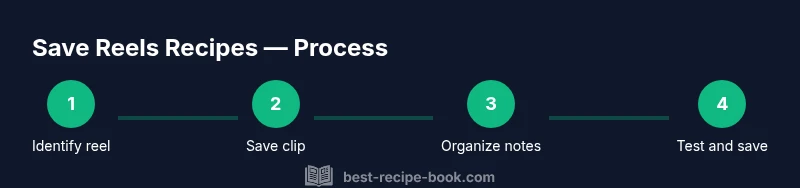
- 1
Identify high-quality reels
Scan for reels with clear demonstrations, legible text, and complete demonstrations of key steps. Note the creator’s handle for credit. Favor videos that show measurements and timing clearly.
Tip: Pause frequently to confirm exact wording and quantities. - 2
Save using platform features
Use the app’s Save, Bookmark, or Clip functions to preserve the reel or extract a clip. If a clip is saved, ensure you still cite the source in your notes.
Tip: Create a dedicated folder for saved reels to avoid mixing with other media. - 3
Create a labeling system
Assign a consistent label to each entry (e.g., Cuisine-MainIngredient-Method) and include the reel link in your notes. This makes retrieval fast and scalable.
Tip: Use a fixed template so every entry has the same fields. - 4
Extract ingredients and steps
Transcribe ingredients and steps from the reel into your recipe template. If a measurement is unclear, leave a placeholder and verify later in the test batch.
Tip: Keep exact quotes short; translate into your own words for clarity. - 5
Verify details
Cross-check with the creator’s original source if available. Test the recipe in a small batch to confirm timing and results before scaling.
Tip: Document any deviations you use during testing. - 6
Organize into your cookbook
Add the verified entry to your digital cookbook, including your notes and substitutions. Back up the collection to cloud storage.
Tip: Review monthly to prune outdated items and update measurements. - 7
Review and update
Periodically revisit saved reels to update notes, fix typos, or add alternative ingredients based on seasonality and pantry.
Tip: Set a quarterly reminder to audit your saved library.
People Also Ask
Is it legal to save recipes from reels?
Saving reels for personal use is generally acceptable when you credit the creator and do not redistribute the complete recipe. Always check platform terms and respect copyright.
Saving reels is usually fine for personal use if you credit the creator and don’t redistribute the full recipe.
Which platforms support saving reels recipes?
Most major platforms, including Instagram, TikTok, and YouTube Shorts, offer saving or bookmarking options. Availability may vary by account settings and regional features.
Instagram, TikTok, and YouTube Shorts let you save or bookmark ideas, depending on account settings.
How can I ensure accuracy of saved recipes?
Cross-check ingredients and steps with the original source when possible, test the recipe in a small batch, and document any adjustments you make for future reference.
Cross-check with the source, test in a small batch, and note any changes for your records.
Can I turn saved reels into a printable cookbook?
Yes. Compile saved entries into a template and export to PDF or print a physical cookbook. Include source credits and your notes for each recipe.
Yes, you can create a printable cookbook by exporting your saved recipes with notes and credits.
What if a reel disappears or is removed?
If a reel is removed, rely on your saved notes and any clipped text. Maintain source citations where possible and seek alternate sources for verification.
If a reel is removed, rely on your notes and try to find another source to verify the recipe.
Watch Video
Key Takeaways
- Organize saved reels with consistent labels.
- Verify details before cooking and note any substitutions.
- Credit creators and avoid redistributing full recipes.
- Turn digital notes into a portable cookbook.
- Regularly audit and update your saved library.